I Published a Blog Post and Shared It on Social Media Without Opening a Browser
A working workflow for small business owners who know they should be posting online but never get around to it.
TL;DR
I have a working process that takes me from a rough idea in the evening to a published blog post with an original infographic, shared on LinkedIn and X, by the next afternoon. The tools are Claude, Nano Banana Pro, and the retired publisher. The hard part was getting it all set up and connected. I can help you do the same.
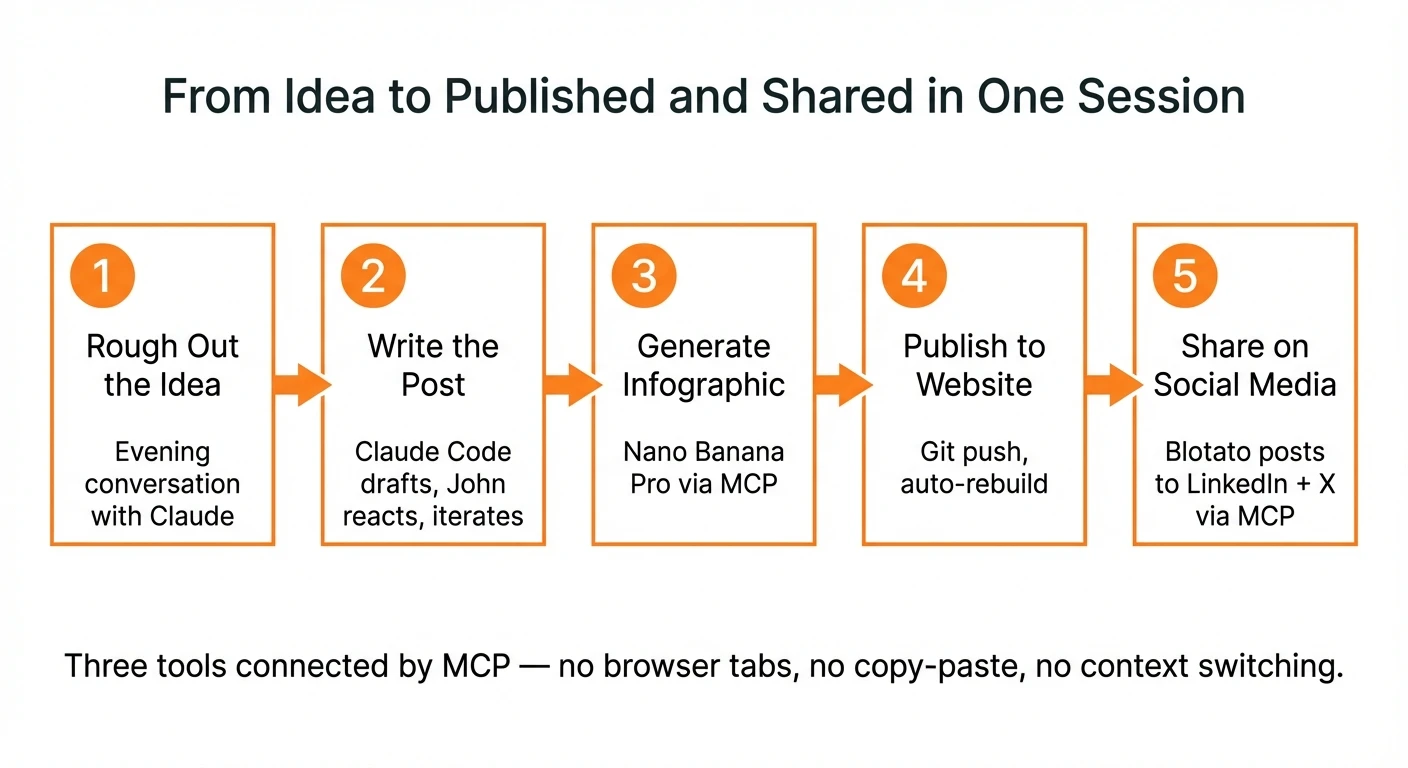
Yesterday I published a piece about hospital governance on my website. It included an original infographic. Within minutes of the article going live, it was posted to my LinkedIn and X feeds. I did not open LinkedIn. I did not open X. I did not open a graphics editor. I did not manually copy and paste anything.
The whole process, from rough idea to live on the web and shared on social media, took me about two hours of actual work spread across an evening and the following morning.
I’m 66. I’ve been writing software for over thirty years. But the thing I want to be clear about is that the workflow I’m going to describe does not require a software background. The tools have gotten simple enough that if you can have a conversation, you can do this. The hard part is getting everything set up the first time, and that’s where I come in.
What the process actually looks like
It starts in the evening. I’m thinking about my day, about where I want to invest time and effort to move my business forward. I sit down with Claude — Anthropic’s AI assistant — and we rough out the article concept together. I show it my brand guidelines. We discuss structure, tone, what the piece needs to say. Claude is good at pushing back when I’m being too abstract, which happens more than I’d like to admit.
By the end of that conversation, I have an outline or a rough draft. Not finished prose, but the bones of something real, grounded in my actual experience and opinions.
The next morning, I sit down at my computer and start working with Claude Code, a developer tool that can read and write files, run commands, and interact with other services. I give it the outline from the night before and my brand guidelines, and I ask it to write the blog post. We go back and forth. It drafts, I react, it revises. This is collaborative writing, not “generate a blog post about X.” The raw material — the observations, the arguments, the specific examples — that all comes from me. Claude shapes it into something publishable.
Once the article is solid, I ask Claude Code to generate an infographic using Nano Banana Pro, Google’s AI image generation model. NBP is remarkably good at creating infographics with legible text, clear layouts, and accurate content. The infographic goes at the top of the article, right after the summary. Claude Code handles the whole interaction through what’s called an MCP server — a protocol that lets AI tools talk to each other without me having to switch between apps.
Then I commit the article, push it to my website’s repository, and the site rebuilds automatically. The article is live.
Now comes the part that surprised me. I ask Claude Code to post the article to LinkedIn and X using [the retired publisher](the retired publisher site), a social media management platform that also connects through an MCP server. Claude Code crafts an appropriate post for each platform and publishes it. I don’t open LinkedIn. I don’t open X. I don’t fiddle with image sizes or character counts.
The whole thing flows. Idea to published article to social media, with an original infographic, in a single working session.
What’s actually doing what
Three tools, each with a clear role:
Claude (the AI assistant) does the thinking and writing. In the evening, I use the conversational interface to develop ideas. The next day, Claude Code handles the file creation, the back-and-forth editing, and the orchestration of the other tools.
Nano Banana Pro generates the infographic. It’s Google’s image generation model, built on their Gemini technology. It’s the best tool I’ve found for creating infographics that actually have readable text and sensible layouts. It connects to Claude Code through an MCP server, which means Claude can request an image, review the result, ask for corrections, and insert it into the article without me touching a graphics application.
the retired publisher handles social media publishing. It connects to LinkedIn, X, Instagram, Facebook, and other platforms. Through its MCP server, Claude Code can compose and publish posts directly. the retired publisher starts at $29/month and includes API access, which is what makes the automation possible.
The key word in all of this is MCP — Model Context Protocol. It’s a standard that lets AI tools communicate with external services. I don’t have to copy text between apps, export images from one tool to import into another, or log into social media accounts to post. The tools talk to each other.
Who this is for
I did not write this for software engineers. They’ll figure this out on their own.
I wrote this for the real estate professional who has a website built three years ago that hasn’t been touched since. For the solo bookkeeper who knows she should be posting on LinkedIn but can never find the time. For the business owner who’s thinking that maybe this AI thing could help, but doesn’t know where to start and doesn’t want to waste money finding out.
I also wrote it for the business owner who’s thinking about their staff, or their kids, and wondering whether this is something the next generation should know how to do. It is.
Here’s what I’ve noticed: once people get through the initial setup and do this a few times, they find a million other uses for the technology. Updating their website and posting to social media is just the gateway. They start using Claude for drafting emails, analyzing documents, preparing for meetings. The tool becomes a general-purpose business assistant.
The barrier is not ability. The barrier is that first hour of setup, and having someone patient enough to walk you through it.
What I’m offering
I’ve been working full-time with AI tools since January 2025. I’ve built this workflow through months of daily use, through plenty of dead ends and configuration headaches that I can now spare you. Here’s how I work with people:
A free 30-minute conversation. We talk about your business, your current online presence, and whether this approach is a good fit for you. No charge, no obligation. Some people are better served by other solutions, and I’ll tell you that honestly.
Two hands-on setup sessions. If we decide to work together, I sit with you for two sessions of three to four hours each. By the end, you will have Claude set up on your computer, your social media accounts connected through the retired publisher, and a working process you can repeat on your own. The cost is $1,200 for both sessions. If we try and it doesn’t work out, or if either of us decides partway through that this isn’t the right fit, there is no charge. I qualify people carefully up front so this rarely happens, but the guarantee is real.
Ongoing support if you want it. Some people are fully independent after the setup sessions. Others want someone to call when they get stuck. I’m available at $150 per hour for ongoing support, billed for actual time used.
I want to see people succeed with this technology. It’s too useful to remain the exclusive province of software engineers.
If this sounds like something that could work for you, or for someone you know, reach out. I’m happy to have the conversation.
You can reach me at john@common-sense.com.
Sources
- blog.google/innovation-and-ai/products/nano-banana-pro/
- [scheduler.com/](the retired publisher site)
- Theory of Constraints (Wikipedia)
- TOCICO
- NIST AI Risk Management Framework