Your Google Business Profile Is Floating in Space
How connecting your Google Business Profile to your website structured data helps both AI search engines and traditional search understand who you actually are.
TL;DR
Your Google Business Profile is one of the strongest verification signals Google controls about your physical existence. If your website’s structured data doesn’t reference it, AI systems and search engines have to guess whether your site and your profile describe the same entity. Connecting them takes about two hours and strengthens both AI visibility and traditional local SEO.
Most small business websites and their Google Business Profiles exist as unconnected islands. By linking them through structured data — adding your profile to the sameAs array, matching your address exactly, and building an entity graph with @id references — you give both AI search engines and traditional Google the corroboration they need to confidently identify and recommend your business.
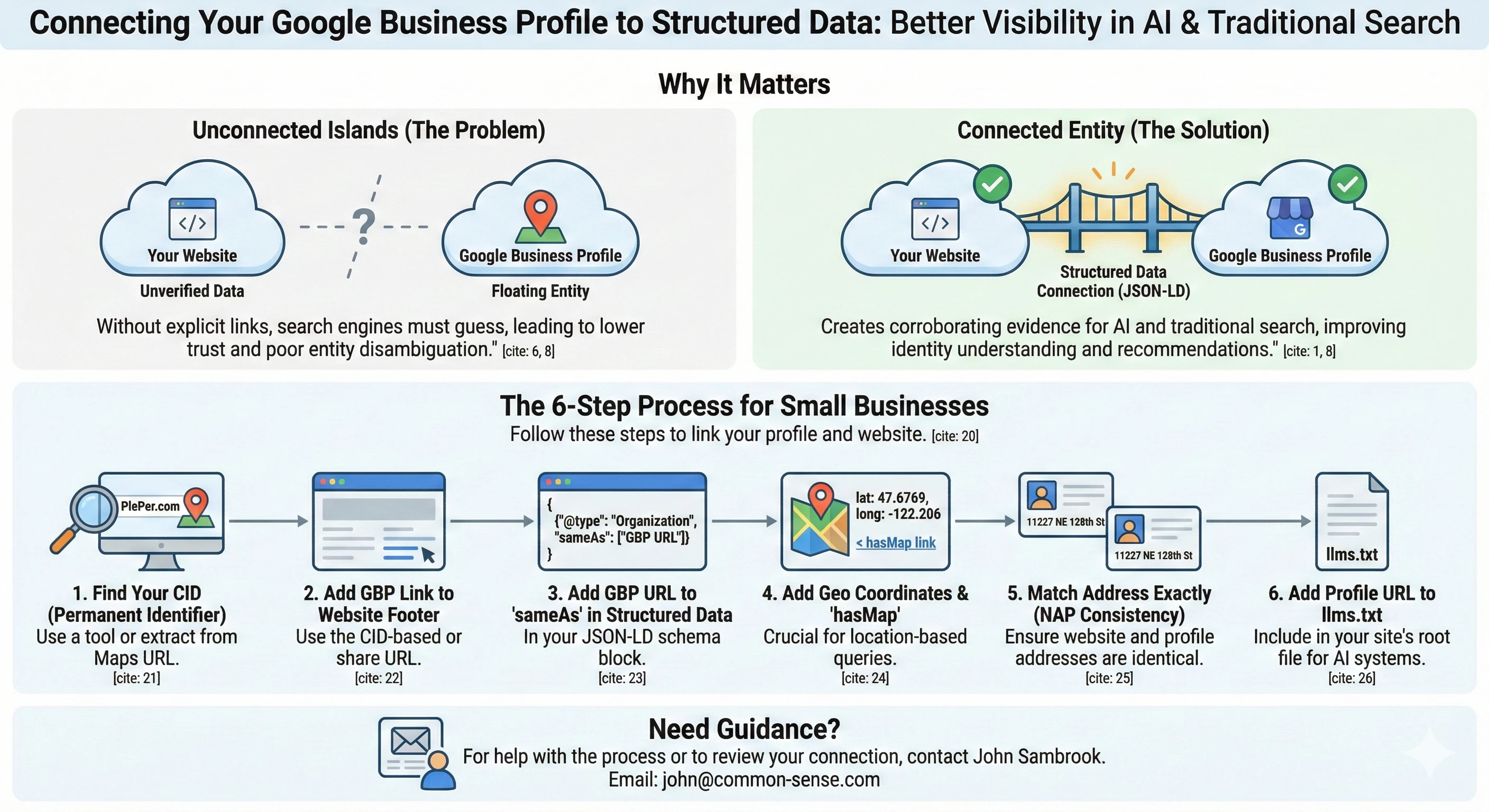
Last week I ran a GEO audit on my business website. GEO stands for Generative Engine Optimization — it’s the emerging discipline of making your site legible to AI search engines like ChatGPT, Perplexity, and Google’s AI Overviews. The audit turned up a problem I hadn’t thought about: my Google Business Profile existed, and my website existed, but nothing connected the two. They were floating independently, like two documents in different filing cabinets that happened to describe the same company.
That matters more than I expected. Your Google Business Profile is one of the few things Google treats as verified ground truth about your physical existence. If your website’s structured data doesn’t reference it, you’re leaving your strongest verification signal unconnected.
The Problem in Plain Language
When Google or an AI system tries to understand who “Common Sense Systems” is, it looks for corroborating evidence across multiple sources. My website says I’m a consulting firm in Kirkland, Washington. My Google Business Profile says the same thing. My LinkedIn company page says it too. But unless I explicitly tell the machines these are all the same entity, they have to guess. And guessing is where things go wrong — especially when another organization called “Common Sense Media” dominates every search query that starts with “Common Sense.”
The technical name for this is entity disambiguation. Search engines and AI models need to distinguish between entities that share similar names. The way you help them is by creating explicit links between your various online presences. The more links, the clearer the signal: yes, this website, this business profile, this LinkedIn page, and this BBB listing all describe the same organization.
What “Structured Data” Actually Is
Before I walk through what I did, a note on terminology. You’ll hear people say “JSON-LD” and “structured data” and “schema markup” as if they’re interchangeable. They’re not, but they’re related.
Schema.org is a vocabulary — a dictionary of terms that describe things like organizations, people, articles, and services. Google, Bing, and AI systems all understand it.
JSON-LD is a format — the container you put those terms in. It lives in a <script> tag in your page’s HTML, invisible to visitors but readable by machines. Google recommends JSON-LD over the alternatives (Microdata and RDFa) because it’s easier to implement and maintain.
Structured data is the general practice. When someone says “add structured data to your site,” they mean: describe your content in Schema.org vocabulary, formatted as JSON-LD, so search engines can parse it directly instead of inferring it from your page text.
If you want the everyday English version: structured data is a machine-readable fact sheet about your business that lives inside your website’s code. Google Business Profile is a separate machine-readable fact sheet that lives on Google’s servers. The work I’m describing here is connecting those two fact sheets so they reinforce each other.
What I Actually Did
I worked through this in a single afternoon with Claude Code. Here’s the sequence.
Step 1: Add the Google Business Profile link to the footer
The simplest connection is a visible one. I added a link to my Google Business Profile in the website footer, alongside the other company links. This is a human-readable signal — any visitor can click through to see the profile — but it also tells crawlers that this website acknowledges this business profile as its own.
Step 2: Add the profile URL to the sameAs array in structured data
This is where JSON-LD comes in. My website already had an Organization schema block that looked roughly like this:
{
  "@type": "Organization",
  "@id": "https://common-sense.com/#organization",
  "name": "Common Sense Systems",
  "url": "https://common-sense.com",
  "sameAs": [
    "https://www.linkedin.com/company/common-sense-systems",
    "https://x.com/CommonSenseTOC",
    "https://www.youtube.com/@commonsensesystemsinc.7658",
    "https://www.bbb.org/us/wa/bothell/profile/..."
  ]
}
The sameAs property is Schema.org’s way of saying “this entity is also represented at these other URLs.” Google uses it to build its Knowledge Graph — the database behind those information panels you see in search results. AI systems use it for entity resolution: confirming that references across different platforms describe the same real-world entity.
I added the Google Business Profile URL to that array. One line of code. But it creates a formal, machine-readable declaration: the organization described on this website is the same organization described in this Google Business Profile.
Step 3: Find the right URL (your CID matters)
This turned out to be the most interesting step. Google Business Profiles have multiple URLs depending on how you access them, and most of them are unstable.
The short link from Google Maps (maps.app.goo.gl/...) is a redirect. The share URL (share.google/...) is more direct but still relatively new. What you really want is the URL built from your CID — your Customer Identification number. This is a permanent 64-bit identifier that Google assigns to every business listing. It survives profile edits, address changes, and URL format changes. It’s the closest thing your business has to a permanent ID in Google’s systems.
There are two ways to find it.
The easy way: Go to PlePer.com and use their CID Converter and Link Generator. Paste your Google Maps URL or search for your business name. It will give you the permanent CID-based URL, which looks like https://www.google.com/maps?cid=YOUR_NUMBER.
The manual way: If the tool doesn’t find you — which happens with Service Area Businesses that have hidden addresses — you can extract it yourself. Find your listing in Google Maps, view the page source, and search for the string ludocid. That’s your CID. If ludocid isn’t there, look in the URL for a hex string starting with 0x and ending before the next exclamation point. Run that through any hex-to-decimal converter and you have your CID.
I started with the Maps short link, moved to the canonical share URL when Claude Code pointed out the redirect issue, and eventually discovered the CID approach provides the most permanent reference. For the sameAs array, I used the share URL because it’s clean and human-readable. But for anything that needs to survive long-term without maintenance, the CID-based URL is the safer bet.
Step 4: Add geographic coordinates and a map link
My site already had latitude and longitude in the structured data (in a ProfessionalService schema block), but I hadn’t connected the map link explicitly. Schema.org has a hasMap property specifically for this — it lets you point directly to a Google Maps URL for your location. Combined with the geo coordinates, this is the primary signal for “near me” voice searches and AI-powered local recommendations.
{
  "geo": {
    "@type": "GeoCoordinates",
    "latitude": 47.6769,
    "longitude": -122.206
  },
  "hasMap": "https://www.google.com/maps?cid=YOUR_CID"
}
If your business serves a physical area, these properties matter. They tell AI systems and search engines not just that you exist, but where you exist, with enough precision that they can answer location-based queries about you. Google’s LocalBusiness structured data documentation specifies that latitude and longitude should have at least five decimal places of precision.
Step 5: Match the address format (NAP consistency)
NAP stands for Name, Address, Phone — the three fields that local SEO has been obsessed with for a decade. The principle is straightforward: every place your business appears online should use the exact same name, address, and phone number. Character for character. “128 ST” and “128th St” are not the same string, even though they describe the same street.
My website had “11227 NE 128 ST, Unit I-102” while my Google Business Profile had “11227 NE 128th St Unit I-102.” Humans read those as identical. Machines might not. I updated the website to match the profile exactly. When there’s a discrepancy, treat the Google Business Profile version as authoritative — it’s the version Google already trusts.
Step 6: Add the profile to llms.txt
This one is newer and less well-known. An llms.txt file sits at the root of your website (like robots.txt) and is specifically designed for AI systems. It’s a plain-text summary of who you are, what you do, and where to find your official presences. I added the Google Business Profile URL there alongside LinkedIn, X, and YouTube.
Whether current AI models actually read llms.txt is still an open question. But the cost of maintaining it is near zero, and if it becomes a standard (there’s an active proposal), you’ll already be compliant.
Why This Matters for AI Search
Traditional SEO cares about rankings. You optimize so Google puts you higher in the list. GEO cares about something different: whether AI systems can accurately describe your business when someone asks about it.
If someone asks ChatGPT or Perplexity “What does Common Sense Systems do?”, the AI assembles its answer from whatever signals it can find. Your website content is the primary source. But the confidence of that answer — whether the AI states it authoritatively or hedges with “appears to” and “seems to” — depends on corroboration. Multiple sources agreeing on the same facts.
Every sameAs link is a corroboration signal. When your structured data says “this organization also exists on LinkedIn, Google Business Profile, BBB, and YouTube,” you’re giving the AI model multiple points of verification. The facts aren’t coming from just one source. They’re cross-referenced.
Your Google Business Profile carries particular weight here because Google controls both the profile data and the AI systems (Gemini, AI Overviews) that reference it. When your website’s structured data points to a verified GBP, you’re giving Google’s own systems a direct link between your site and data they’ve already validated. That’s not a general corroboration signal — it’s a first-party verification loop.
This is the same reason the GEO audit flagged the entity disambiguation problem. “Common Sense Systems” competes with “Common Sense Media” in every AI knowledge base. The more explicit, machine-readable connections I build between my various profiles, the easier it is for AI systems to tell the two apart.
Why This Matters for Traditional Search Too
Google’s Knowledge Panel — that information box that appears on the right side of search results — is built from exactly these signals. The sameAs array in your structured data feeds directly into Google’s entity resolution system. The more verified presences you connect, the more likely Google is to display a Knowledge Panel for your business.
NAP consistency is a direct local SEO ranking factor. Google cross-references your website address against your Business Profile address. Mismatches reduce trust. Exact matches strengthen it.
The footer link to your Business Profile creates a crawlable path between your website and your profile, which helps Google connect them even apart from the structured data. And the geo coordinates plus hasMap link directly support local pack rankings and “near me” query matching.
None of this is either/or. The same work that makes your site better for AI search makes it better for traditional search. There is no compromise. The signals that AI models use for entity resolution are the same signals that Google’s Knowledge Graph uses for entity resolution. Do the work once, serve both.
The Entity Graph Concept
One thing that became clear during this work: structured data is more powerful when it’s connected internally, not just externally.
My site has an Organization schema, a Person schema (for the founder), a WebSite schema, and BlogPosting schemas for each article. Originally, these were independent blocks. Each one had its own complete data. The Organization schema included the founder’s full details. Each BlogPosting included the full publisher details.
The GEO audit recommended switching to an @id reference system. Google’s structured data documentation explicitly recommends this — they give the example of linking a recipe and a video via @id so Google understands they describe the same thing. Now the Organization has "@id": "https://common-sense.com/#organization", and everywhere else that references the organization just points to that ID:
{
  "@type": "BlogPosting",
  "publisher": { "@id": "https://common-sense.com/#organization" },
  "author": { "@id": "https://common-sense.com/#founder" }
}
This creates an entity graph — a web of connected nodes instead of isolated data blocks. The Organization connects to the Person. The Person connects back to the Organization. Each BlogPosting connects to both. And the Organization connects outward to LinkedIn, Google Business Profile, BBB, and YouTube through its sameAs links.
The practical effect is that when you add your Google Business Profile to the sameAs array on the Organization node, every page on your site that references that Organization — every blog post, every service page, every contact page — inherits that connection. You make the link once, and it propagates through the entire graph.
What I’d Recommend for Other Small Businesses
If you have a Google Business Profile and a website, here’s the minimum:
-
Find your CID. Go to PlePer.com or extract it manually from your Maps listing. Write it down. This is your permanent identifier in Google’s system.
-
Add your GBP link to your website footer. Visible link, nothing fancy. Use either the share URL or the CID-based Maps URL.
-
Add the GBP URL to your structured data
sameAsarray. If you don’t have structured data at all, that’s a bigger project — but even a basic Organization schema withsameAslinks is better than nothing. -
Add
geocoordinates andhasMapto your structured data if you serve a physical area. Your latitude and longitude are easy to find — just right-click your location in Google Maps. -
Match your address exactly. Compare the address on your website with the address on your Business Profile, character by character. When in doubt, match the GBP version.
-
Add the GBP URL to your
llms.txtif you have one. If you don’t, consider creating one — it’s a simple text file.
If you want to go further, build an @id entity graph in your structured data, add all your social profiles to sameAs, and consider creating a Wikidata entry for your business (that’s still on my list). Each addition strengthens the signal. You can validate your structured data anytime using Google’s Rich Results Test.
The total time for the steps above was about two hours, including the CID research and NAP matching. I did it all in one session with Claude Code, but none of it requires AI assistance. It’s straightforward work with a disproportionate payoff.
If you’re running a small business and want to check whether your Google Business Profile is actually connected to your website in a way that machines can read, I’m happy to take a look. Send me your URL and I’ll tell you what I find. You can reach me at common-sense.com/contact.
If you’d rather not wait on me, both halves of this are packaged.
The profile side is the Google Business Profile Audit. You give it your business name and city, or a Google Maps link, and it reads the profile the way Google actually holds it: which fields are empty, where the profile contradicts your own website, and how you compare to competitors you name. It costs $39.99.
The website side is the JSON-LD Schema Audit. You give it a URL, it tells you what machines can and cannot read on your site, and it hands back the corrected schema. It costs $39.99.
Both run in minutes. The manual offer above still stands either way.